
How Websites Work A Simple Guide for Beginners
In today’s digital world, websites are part of our daily life. We use them for studying, shopping, banking, entertainment, and business. But most people do not know what happens when they open a website.
This How Websites Work Simple Guide explains everything in clear and simple language. If you are a student, blogger, freelancer, or beginner, this guide will help you understand how websites actually function.
Let us begin from the basics and slowly move forward.
What Is a Website in Simple Words?
A website is a digital space on the internet where information is stored and shown to users. It contains pages made of text, images, videos, and buttons.
Every website needs:
- A name (domain)
- A storage place (hosting)
- Files (HTML, CSS, JS)
- Software system
Without these, a website cannot work. This is the foundation of How Websites Work Simple Guide.
What Happens When You Type a Website Address?
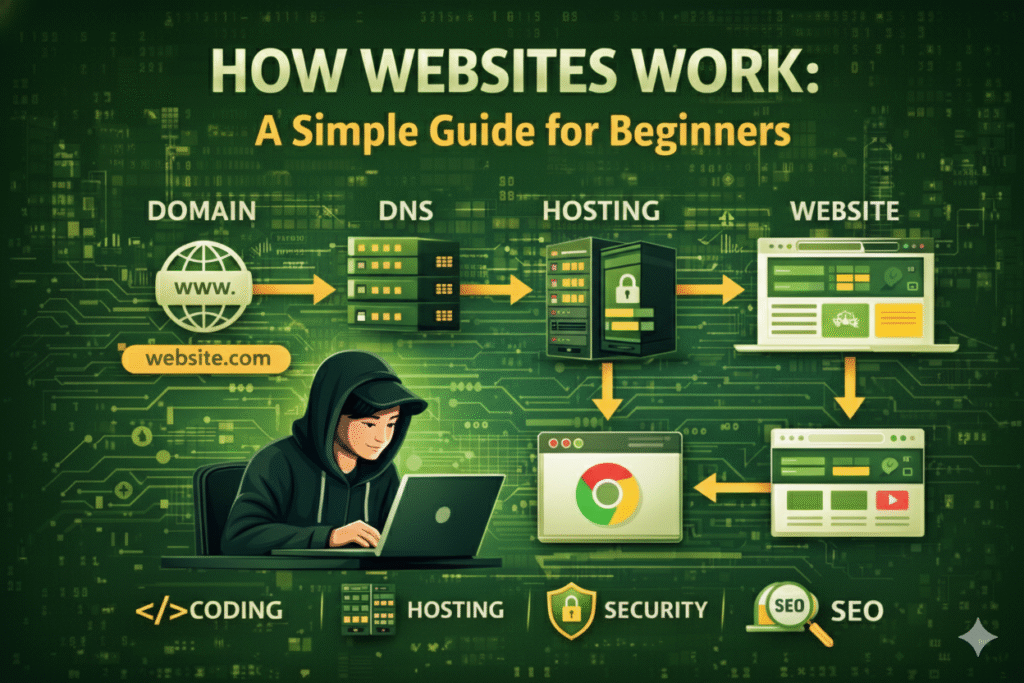
When you enter a website name in your browser, many things happen within seconds.
Step-by-step process:
- Browser sends a request
- DNS finds the server
- Server sends website files
- Browser shows the page
This automatic process makes websites load quickly and smoothly. Understanding this is important in How Websites Work Simple Guide.
Understanding Domain Names
A domain name is the online address of a website.
Examples:
- google.com
- flipkart.com
- youtube.com
Instead of remembering numbers, users remember names. Domains make websites easy to access.
Domain names play a major role in How Websites Work Simple Guide.
What Is DNS and Why Is It Important?
DNS means Domain Name System. It acts like a phone directory of the internet.
It changes:
Website name → Server address
Example:
amazon.in → IP number
Without DNS, browsers cannot find websites. DNS is a silent worker in How Websites Work Simple Guide.
Web Hosting: Where Websites Live
Hosting is the service that stores website files on the internet.
Types of hosting:
- Shared hosting (low cost)
- VPS hosting (medium level)
- Cloud hosting (high performance)
- Dedicated hosting (enterprise level)
Good hosting improves speed, security, and uptime. Hosting is a key part of How Websites Work Simple Guide.
Role of Web Servers
A web server is a powerful computer that delivers websites.
Popular servers:
- Apache
- Nginx
- LiteSpeed
When users visit a website, the server sends files to their browser.
Servers are the heart of How Websites Work Simple Guide.
What Is a Web Browser?
A browser helps users view websites.
Examples:
- Chrome
- Firefox
- Edge
- Safari
Browsers read website code and convert it into readable pages.
Without browsers, How Websites Work Simple Guide cannot function.
HTML: Building the Website Structure
HTML creates the basic structure of websites.
It controls:
- Headings
- Paragraphs
- Images
- Links
HTML works like the bones of the website.
Every How Websites Work Simple Guide starts with HTML.
CSS: Making Websites Beautiful
CSS controls the design of websites.
It manages:
- Colors
- Fonts
- Layout
- Effects
Without CSS, websites look boring. Design is important in How Websites Work Simple Guide.
JavaScript: Bringing Life to Websites
JavaScript adds action to websites.
It allows:
- Popups
- Forms
- Animations
- Live updates
Most modern websites use JavaScript.
It is a powerful part of How Websites Work Simple Guide.
Frontend vs Backend Explained
Frontend
The visible part.
Includes:
HTML + CSS + JavaScript
Backend
The hidden system.
Includes:
Server + Database + Logic
Both work together in How Websites Work Simple Guide.
What Is a Website Database?
A database stores website information.
Examples:
- User accounts
- Orders
- Messages
- Products
Popular databases:
- MySQL
- MongoDB
- PostgreSQL
Without databases, modern websites cannot work. Databases support How Websites Work Simple Guide.
Static and Dynamic Websites
Static Websites
- Fixed pages
- No updates
- Faster loading
Dynamic Websites
- Database-driven
- User interaction
- Regular updates
Most websites today are dynamic.
This difference matters in How Websites Work Simple Guide.
How Information Travels Online
Data moves through:
- Internet cables
- Routers
- Servers
- Networks
Protocols like HTTP and HTTPS manage data transfer.
This process supports How Websites Work Simple Guide.
Website Security and HTTPS
HTTPS keeps data safe.
It uses encryption to protect users.
Benefits:
- Protects passwords
- Builds trust
- Improves Google ranking
Security is essential in How Websites Work Simple Guide.
How Websites Load So Fast
When you open a site:
- Browser requests data
- Server responds
- Files download
- Page displays
Caching and CDN improve speed.
Speed optimization is part of How Websites Work Simple Guide.
Content Management Systems (CMS)
CMS helps manage websites easily.
Examples:
- WordPress
- Joomla
- Drupal
CMS allows beginners to create websites without coding.
CMS supports How Websites Work Simple Guide.
APIs and Website Features
APIs connect websites with services.
Examples:
- Payment gateway
- Maps
- Login systems
APIs improve website functions.
Advanced How Websites Work Simple Guide includes APIs.
Mobile-Friendly Websites
Responsive websites work on all devices.
Benefits:
- Better SEO
- More visitors
- Better user experience
Mobile design is important in How Websites Work Simple Guide.
SEO and Website Structure
SEO helps websites rank on Google.
Important factors:
- Speed
- Mobile-friendly
- Keywords
- Quality content
SEO depends on good website design.
That is why SEO fits in How Websites Work Simple Guide.
Common Problems Beginners Face
New learners often face:
- Slow loading
- Errors
- Broken links
- Security issues
Learning to fix these builds confidence.
This completes How Websites Work Simple Guide.
How to Start Learning Website Development
Begin with:
- HTML & CSS
- JavaScript basics
- WordPress practice
- Hosting setup
- Live projects
Practice makes you better.
This is part of How Websites Work Simple Guide.
Career Opportunities in Web Technology
Web skills lead to:
- Freelancer
- Developer
- SEO expert
- Digital marketer
Web knowledge opens many doors.
That is why How Websites Work Simple Guide is valuable.
Future of Websites
Future trends:
- AI websites
- Voice search
- Progressive Web Apps
- Smart automation
Technology keeps evolving.
Future learning matters in How Websites Work Simple Guide.
Final Conclusion
Understanding How Websites Work Simple Guide gives you strong digital knowledge. You learn about domains, hosting, coding, servers, databases, and security.
This knowledge helps you build websites, manage businesses, and grow online.
Start learning today. One step at a time.
Your success starts now.