
How to Save Battery Life on Your Smartphone (Simple Tips That Actually Work)
Introduction
In today’s digital world, smartphones have become an essential part of our daily lives. From online classes and office work to entertainment, shopping, and social media, we depend heavily on our mobile phones. However, one common problem almost everyone faces is poor battery life on your smartphone. No matter how advanced your phone is, fast battery drain can be frustrating and stressful.
Many users think that only buying a new phone can solve battery issues, but that is not true. With the right habits and settings, you can significantly improve battery performance and extend usage time. This guide explains practical and easy methods to save battery life on your smartphone without using complicated technical tricks.
Why Battery Life on Your Smartphone Drains Quickly
Before learning how to save battery, it is important to understand why batteries drain fast:
- Excessive screen brightness
- Background apps running continuously
- Mobile data, Wi-Fi, and Bluetooth always ON
- Poor network signal
- Heavy apps like games and video streaming
- Old software versions
- Battery aging over time
By fixing these small issues, you can greatly improve battery life on your smartphone.
1. Reduce Screen Brightness and Timeout
The display is the biggest battery consumer.
What to do:
- Reduce brightness manually instead of auto mode
- Set screen timeout to 30 seconds or 1 minute
- Use dark mode if available
Dark mode especially helps OLED screens and improves battery life on your smartphone significantly.
2. Turn Off Unused Connectivity Features
Keeping all connections ON drains battery even when not in use.
Turn OFF when not needed:
- Bluetooth
- GPS / Location
- Mobile hotspot
- NFC
Only keep Wi-Fi or mobile data active when required. This simple habit can save a lot of battery.
3. Close Background Apps Properly
Many apps continue working in the background and consume power.
Tips:
- Close unused apps from recent apps menu
- Restrict background activity for rarely used apps
- Avoid installing unnecessary apps
Reducing background processes improves battery life on your smartphone and performance.
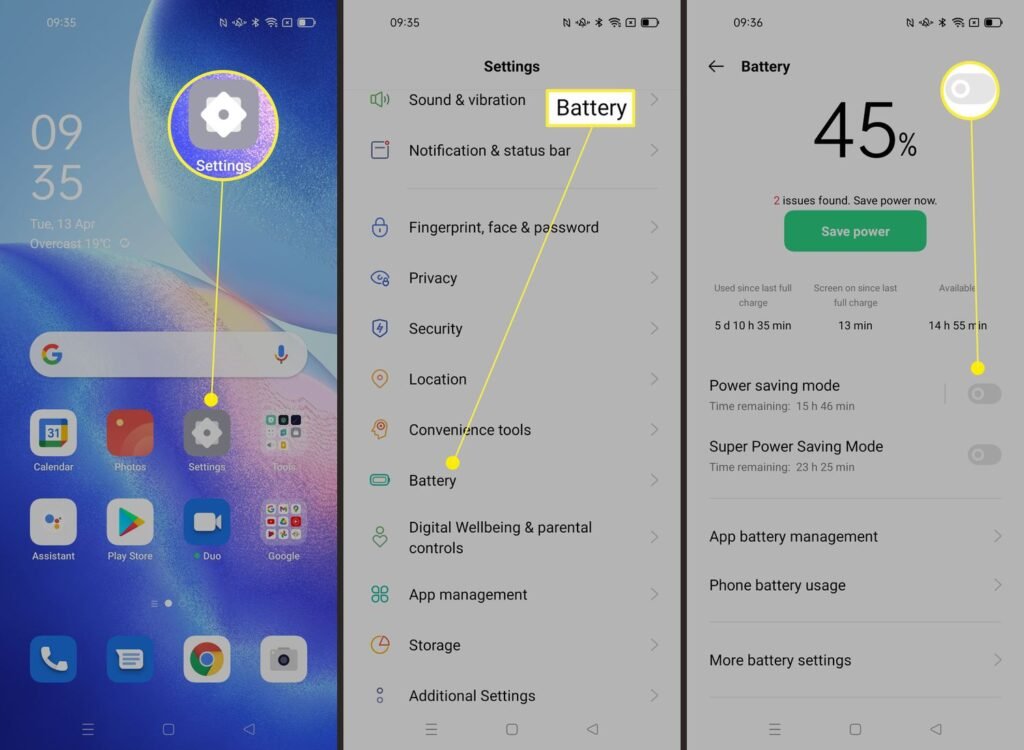
4. Use Battery Saver Mode Wisely
Most smartphones have a built-in battery saver mode.
Benefits:
- Limits background activity
- Reduces screen brightness
- Disables unnecessary animations
Use battery saver mode when your battery is below 30% or during long days outside.
5. Control App Notifications
Too many notifications wake your screen frequently.
Best practices:
- Turn off notifications for non-essential apps
- Disable vibration for notifications
- Keep only important alerts ON
Fewer notifications mean less screen activity and better battery life on your smartphone.
6. Keep Your Software Updated
Many users ignore system updates, but they are important.
Why updates help:
- Fix battery drain bugs
- Improve system optimization
- Enhance security
Always keep your phone’s OS and apps updated to maintain good battery health.
7. Avoid Overcharging and Deep Discharging
Charging habits play a big role in battery lifespan.
Healthy charging tips:
- Avoid charging overnight regularly
- Keep battery between 20% and 80%
- Use original charger or certified cables
Good charging habits protect long-term battery life on your smartphone.
8. Reduce Auto-Sync and Background Data
Auto-sync continuously refreshes apps.
Turn off auto-sync for:
- Email apps (check manually)
- Cloud storage
- Social media apps
This reduces internet usage and saves battery.
9. Uninstall or Replace Battery-Hungry Apps
Some apps consume more power than others.
Examples:
- Heavy games
- Video editing apps
- Social media apps
Check battery usage in settings and remove apps that drain battery excessively.
10. Keep Your Phone Cool
Heat damages battery health permanently.
Avoid:
- Direct sunlight
- Using phone while charging
- Playing games for long hours
Keeping your phone cool helps maintain battery life on your smartphone for a longer period.
11. Use Wi-Fi Instead of Mobile Data
Mobile data consumes more power than Wi-Fi.
Recommendation:
- Use Wi-Fi whenever available
- Avoid weak network areas
This reduces power usage and improves browsing speed.
12. Enable Adaptive Battery (Android)
Android phones offer adaptive battery features.
Benefits:
- Learns your usage pattern
- Limits power to unused apps
- Improves standby time
Enable it from battery settings for smarter power management.
13. Reduce Animations and Visual Effects
Animations look good but consume power.
How:
- Reduce motion in accessibility settings
- Disable live wallpapers
- Avoid dynamic themes
This improves speed and battery life on your smartphone.
14. Restart Your Phone Occasionally
Restarting clears background memory and system glitches.
Recommendation:
- Restart once every 3–4 days
This simple habit can fix unexpected battery drain.
15. Replace Battery When Needed
If your phone battery drains very fast even after following all tips, the battery may be old.
Signs:
- Battery drops suddenly
- Phone heats up
- Charging takes too long
Replacing the battery can restore original battery life on your smartphone at a low cost.
Common Myths About Smartphone Battery
❌ Closing all apps always saves battery
❌ Charging overnight always damages battery
❌ Task killer apps improve battery
Modern smartphones are smarter; proper settings matter more than myths.
Conclusion
Maintaining good battery life on your smartphone does not require expensive tools or technical skills. Small daily habits like reducing brightness, managing apps, and using battery saver modes can make a big difference. By following these simple tips, you can enjoy longer screen time, better performance, and a stress-free mobile experience.
Start applying these tips today and make your smartphone battery last longer every single day.